














Promotional USB sticks can be a practical choice when you want to give clients, staff or event attendees something they can actually use. Unlike a giveaway that may be forgotten after an event, a well-chosen USB drive can stay in a laptop bag, desk drawer or office for regular file storage.
The challenge is choosing the right one.
Storage capacity, connector type, material, branding method and intended use can all affect which promotional USB is suitable for your campaign. A drive intended to hold a few PDFs, for example, does not need the same specifications as one carrying videos, presentations or large image files.
This guide explains what to look for when comparing promotional USB sticks, from storage capacity and USB styles to branding options and practical use cases.
Why Use Promotional USB Sticks?
USB drives combine a physical promotional product with practical digital storage.
Businesses can use them at trade shows, conferences, seminars, staff onboarding sessions and client presentations. They can also be included in corporate gifts where the recipient needs access to digital files.
A USB drive can be useful for storing:
- company brochures
- product catalogues
- presentation files
- training documents
- images
- videos
- technical information
- event resources
If you are comparing different styles, the Promotional Pens USB drive range includes custom options designed for business branding.
The important point is to match the USB to its intended purpose rather than simply choosing the cheapest or largest drive available.
Choose the Right Storage Capacity
One of the first decisions is storage capacity.
The right capacity depends mainly on what will be stored on the drive and whether recipients are expected to continue using it afterwards.
1GB to 4GB
Smaller capacities may be enough for simple documents, brochures, PDFs and event information.
They can work well when the USB is mainly being used to distribute a small collection of files.
8GB to 16GB
This range provides more flexibility for general business use.
It gives recipients enough room for presentations, photos, documents and other everyday files without moving into unnecessarily large capacities.
For many custom USB drives, this is a practical middle ground between cost and usability.
32GB and Above
Larger drives are better suited to campaigns involving video files, high-resolution images or larger document libraries.
They may also be appropriate for premium business gifts where you want recipients to continue using the drive for their own files.
Before ordering, check the size of the content you plan to preload. This helps avoid paying for storage that your campaign does not need.
USB 2.0, USB 3.x and USB-C
Storage capacity is only part of the decision. Connector and transfer technology matter too.
USB 2.0
USB 2.0 may still be adequate for straightforward document storage, particularly when dealing with smaller files.
However, transferring larger video or image files can take noticeably longer.
USB 3.x
USB 3.x technology can support much faster data transfer than older USB 2.0 connections, although actual speed depends on the drive, device and files involved.
If you plan to distribute large presentations, image libraries or video content, a faster drive may provide a better experience.
USB-C
Modern computers, tablets and other devices increasingly use USB Type-C connectors.
The USB Implementers Forum maintains the official USB Type-C specification, which defines the connector system used across compatible devices.
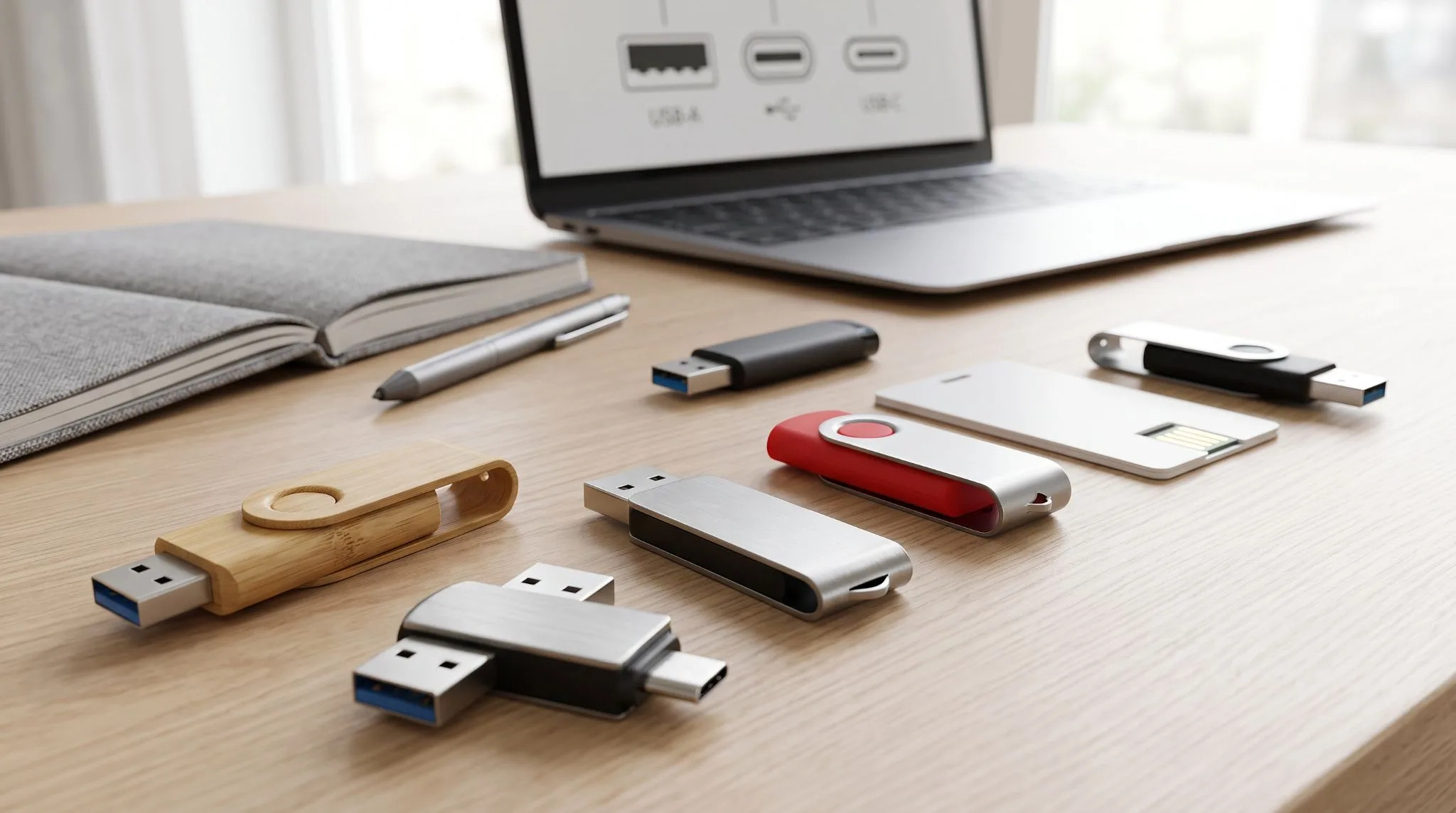
For audiences using a mix of older and newer hardware, a dual USB-A and USB-C design can be worth considering.
Popular Promotional USB Stick Styles
The physical design affects how a branded USB looks, feels and is used.
Different styles also provide different amounts of space for logos and artwork.
Swivel USB Flash Drives
The classic swivel USB flash drive remains popular because it has a simple design with no separate cap to lose.
A rotating metal section protects the connector when the drive is not being used.
The flat surface also provides an obvious area for a logo, making this style suitable for everyday promotional campaigns.
Credit Card USB Drives
Credit-card-style drives offer a much larger branding area.
Their flat surface can accommodate larger graphics, detailed artwork and full-colour designs more easily than a small conventional USB.
They are also thin enough to fit into wallets, document folders and event packs.
Wooden and Bamboo USB Drives
Wood or bamboo can provide a warmer, more natural appearance than plastic or metal.
These materials are often paired with laser engraving, which creates the branding directly on the surface rather than adding coloured ink.
Be careful when describing products using environmental terms. The ACCC says environmental and sustainability claims should be truthful, accurate and supported by reasonable grounds.
Avoid broad claims such as “environmentally friendly” unless there is evidence to support the specific product claim.
Metal USB Drives
Metal USB drives can suit professional environments, executive gifts and client packs where presentation matters.
They can also work particularly well with laser engraving because the branding becomes part of the surface.
Custom-Shaped USB Drives
A custom shape can make the drive closely connected to a particular business, product or campaign.
A USB might be designed around a company logo, product shape, vehicle or another recognisable object.
This can create a more memorable promotional item, although custom moulding may involve longer production times than selecting an existing design.
Branding Methods for Promotional USB Sticks
The best branding method depends on the USB material, artwork and desired finish.
Common branding methods include screen printing, pad printing, digital printing and laser engraving.
Screen Printing
Screen printing works well for straightforward logos and solid colours on suitable flat surfaces.
It can be a good option when the branding needs to be clearly visible and the design does not require complex gradients or photographic detail.
Pad Printing
Pad printing is commonly used on promotional products with smaller or slightly curved printing areas.
It can reproduce simple logos and text clearly on many plastic and metal surfaces.
Digital Printing
Digital printing can suit designs containing multiple colours, detailed graphics or photographs.
Credit-card-style USB drives are particularly well suited to larger full-colour artwork because of their flat printable surface.
Laser Engraving
Laser engraving marks the material itself rather than applying ink over the surface.
It is particularly suitable for metal, bamboo and wood finishes.
The result is generally subtle and professional, making engraved branded USB flash drives suitable for client gifts and corporate promotions.
Businesses considering other professionally branded items can also browse branded promotional pens for campaigns where USB drives are being paired with stationery.
Can You Preload Files Onto Promotional USB Drives?
One of the most useful features of promotional USB flash drives is the ability to provide digital content along with the physical product.
Depending on the supplier and drive configuration, you may be able to preload materials such as:
- product catalogues
- company brochures
- staff handbooks
- presentation decks
- event resources
- software installers
- videos
- training documents
This is particularly useful when USB drives are being distributed during conferences, training sessions or sales presentations.
Keep the files organised and clearly labelled. Avoid filling the entire drive with branded content because recipients may want to use the remaining storage themselves.
If the USB is part of a larger client or employee pack, you could pair it with custom notebooks and journals or other practical business stationery.
Think About USB Security
USB drives are convenient, but businesses should also consider how removable storage is used.
The Australian Cyber Security Centre advises users not to connect untrusted external devices because removable media can be used to spread malware.
For organisations handling sensitive systems or information, removable media policies may also be appropriate. Cyber.gov.au recommends controlling removable storage devices to reduce the risk of malware execution and unauthorised data exposure.
NIST similarly notes that portable storage media such as USB flash drives remain useful for transferring data, but organisations should consider procedural, physical and technical controls when they are used in sensitive environments.
For a general marketing giveaway, this does not mean USB drives should be avoided. It simply means businesses should use reputable products, load only intended files and consider their own security requirements before distributing devices containing sensitive information.
How to Choose a Promotional USB Supplier
When comparing suppliers, look beyond the appearance of the drive.
Ask practical questions about the product, branding and order process.
Check the Available Capacity
Confirm that the advertised storage capacity suits your content requirements.
Review the Branding Area
A detailed logo may need more space than a simple company name.
Ask for an artwork proof so you can see how the final branding will appear before production begins.
Promotional Pens states that customers ordering its custom USB range can review a digital artwork mock-up before production.
Confirm the Branding Method
Check whether your selected model supports laser engraving, screen printing, pad printing or digital printing.
Not every method is suitable for every material.
Check Turnaround and Delivery
If the USB drives are needed for an event, work backwards from the event date.
Allow time for artwork approval, production and delivery rather than ordering immediately before the deadline.
Consider Other Campaign Items
USB drives often work well as one part of a wider promotional pack.
For example, a seminar pack could combine a USB containing presentation material with a notebook and pen.
You can compare additional office stationery and promotional accessories if you are creating a coordinated event or staff pack.
When Do Promotional USB Sticks Work Best?
Custom branded USBs make the most sense when the product has a clear purpose.
Common situations include:
- conferences and trade shows
- client presentations
- seminars and training sessions
- staff onboarding
- product launches
- sales kits
- corporate gifting
- educational resources
The strongest campaigns connect the physical item with useful content.
For example, a property company could preload project information. A training provider could include course materials. A manufacturer could provide specifications and product catalogues.
That connection gives the USB a reason to be used beyond simply displaying a logo.
If you are building a broader gifting campaign, the Promotional Pens guide to business gifting ideas provides additional ideas for combining practical branded products.
Promotional USB Sticks: What to Remember Before Ordering
There is no single USB design or storage capacity that suits every campaign.
Before ordering, consider:
- what files need to be stored
- how much storage is genuinely required
- whether recipients use USB-A, USB-C or both
- which material suits your brand
- how much artwork space you need
- whether printing or laser engraving suits your logo
- when the drives need to arrive
- whether data security requirements apply
The best promotional USB sticks are practical first and promotional second. Choose a drive that recipients have a reason to keep, then apply branding that is clear without overwhelming the product.
For swivel USBs and other custom USB flash drives, explore the Promotional Pens USB drive collection to compare available branding options for your next campaign.